Christian SVG Design: Getting the Most from God Is Faithful Graphics
Whether you are a small business owner creating custom greeting cards, a blogger looking for meaningful visual elements, or a hobbyist crafting gifts for your church community, Christian SVG designs have become a go-to resource. Among the most popular themes is the “God Is Faithful” motif—a simple yet powerful declaration that resonates deeply with many believers. But as straightforward as downloading and using an SVG file may seem, there are plenty of pitfalls that can turn a promising project into a frustrating experience. Understanding these common missteps will save you time, money, and unnecessary stress, while helping you produce work that truly honors the message behind the design.
What Christian SVG Design “God Is Faithful” Offers and Why It Matters
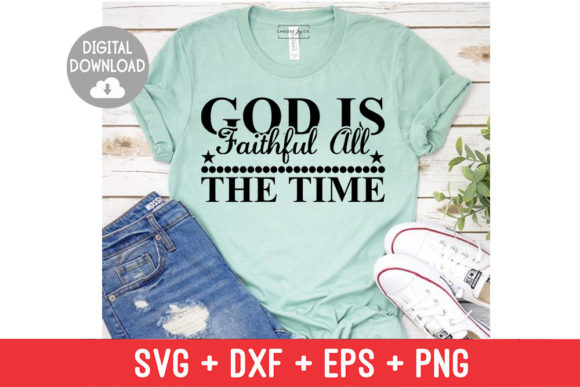
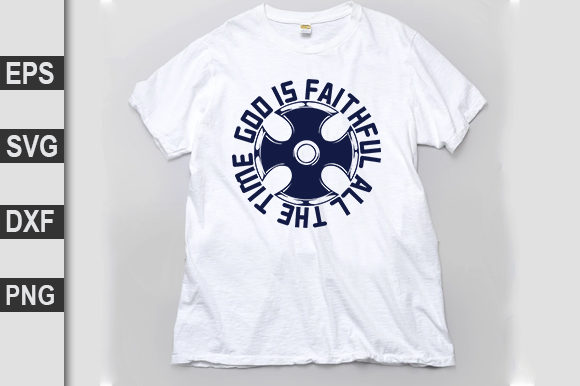
SVG stands for Scalable Vector Graphics, a file format that allows designs to be resized without losing quality. A Christian SVG design featuring the phrase “God Is Faithful” typically combines elegant typography with symbolic elements such as crosses, doves, olive branches, or floral accents. These files are used in everything from digital invitations and social media posts to physical products like t-shirts, mugs, wall art, and vinyl decals.
What draws people to this particular theme is its blend of visual appeal and spiritual significance. The message is both personal and universal, making it suitable for a wide range of contexts—from Sunday school crafts to professional branding for faith-based businesses. The versatility of SVG files means you can adapt the same design for multiple purposes, but only if you choose the right file and handle it correctly from the start.
Overlooking File Quality and Scalability
Not all SVG files are created equal. A frequent mistake is assuming that any file labeled “SVG” will scale perfectly. Poorly constructed SVGs can contain unnecessary nodes, broken paths, or embedded raster elements that defeat the purpose of vector graphics. When you enlarge such a file, you may end up with jagged edges or missing parts, especially in intricate lettering found in “God Is Faithful” designs.
Check the file before you buy or download. Open it in a vector editing program like Inkscape (free) or Adobe Illustrator to inspect the paths. Look for clean curves and smooth transitions. If you see an unusual number of anchor points or blurred areas, that file likely wasn’t prepared by someone who understands vector tools well. A well-made SVG will remain crisp at any size, from a tiny sticker to a large banner.
Ignoring License Restrictions
Many Christian SVG designs are sold or shared under specific license agreements. A common oversight is assuming that a purchase grants unlimited commercial use. In reality, some licenses restrict the number of products you can sell, require attribution, or forbid using the design in digital products like templates or print-on-demand services.
Before you start your project, read the licensing terms carefully. If you plan to sell items featuring a “God Is Faithful” design—whether on Etsy, at a church fundraiser, or in your own shop—look for files labeled “commercial use” or “extended license.” If the license is unclear, reach out to the designer. This simple step prevents legal headaches and supports creators who rely on fair compensation for their work.
Choosing Style Over Readability
It is easy to be drawn to ornate, highly decorative typography. However, when the text is meant to be the focal point—as with “God Is Faithful”—readability matters. Some designs use cursive scripts that look beautiful at full size but become illegible when scaled down or cut from vinyl. Thin strokes can break during weeding, and overlapping letters can merge into an unreadable blob when transferred to fabric or paper.
Test the design at the actual size you intend to use. Print it on paper or do a small test cut with vinyl. If you struggle to read the words from a few feet away, consider a cleaner version. Many designers offer multiple style variations of the same verse, so you can choose one that balances artistry with clarity.
Verify Compatibility with Your Software and Machine
SVG files are widely supported, but not all programs handle them identically. If you use a cutting machine like a Cricut or Silhouette, check that the file format matches your device’s requirements. Some older machines prefer DXF or PNG with transparent backgrounds, while newer models handle SVG directly. Even within SVG, there are differences in how text and images are saved.
If you purchase a “God Is Faithful” design and it arrives with fonts that your system doesn’t have, the text may appear distorted or missing. To avoid this, look for files where the text has been converted to paths (outlined). This ensures the design looks exactly as the creator intended, regardless of the fonts installed on your computer. Many quality designers provide both outlined and editable versions so you have flexibility.
Don’t Skip the Test Cut
Even experienced crafters sometimes skip this step, but it is one of the most effective ways to prevent wasted material. Load a scrap piece of vinyl or paper and run a small test cut of the design. Check that the cut pressure and blade depth are appropriate for your material. Pay attention to small details like the crossbar on a letter “t” or the curve of a leaf—these are often the first areas to fail if settings are off.
Adjust your machine settings based on the test. If the design has delicate elements, you may need to slow down the cut speed or use a stronger grip mat. A test cut takes five minutes and can save you from ruining an entire sheet of expensive adhesive vinyl or heat transfer material.
Plan Your Layout and Size Purposefully
A “God Is Faithful” design may look balanced on screen, but the real-world application often requires adjustments. For a mug, you want the text to wrap naturally without crowding the handle. For a t-shirt, the design should sit at chest level and scale proportionally to the garment size. For wall art, consider the frame dimensions and surrounding decor.
Measure your surface area and visualize the final placement. Use the scaling tools in your design software to adjust the size while maintaining proportions. If the design includes multiple elements—a cross, flowers, and the text—arrange them so they fit harmoniously within your chosen space. Grouping elements before cutting or printing makes the process smoother.
Source Reputation and File Quality
Not every marketplace or freebie site offers reliable files. Look for sellers or creators with positive reviews, clear product images, and responsive customer support. If the listing shows mockups that look pixelated or inconsistent, that is a red flag. Reputable designers typically display close-ups of the actual vector paths, not just rendered previews.
Free resources can be excellent, but they often come with less quality control. If you download a free “God Is Faithful” SVG, inspect it thoroughly before using it for a paid project. A little caution upfront prevents disappointment later.
File Format and Delivery Method
Make sure the file you receive is truly an SVG and not a raster image saved with a .svg extension. You can check by opening it in a text editor—real SVG files contain XML code, not pixel data. Also, confirm whether the download includes additional formats like DXF, EPS, or PNG. Having multiple formats gives you flexibility across different software and devices.
Customer Support and Community
Designers who are active in online crafting communities or who offer tutorials often provide better support. If you run into issues with scaling or cutting, a quick message to a responsive creator can solve the problem. Many also share tips on materials, settings, and project ideas that help you get the most from their designs.
Realistic Examples of Better Approaches
Let’s say you want to create a set of “God Is Faithful” bookmarks for a women’s ministry event. A common mistake would be choosing a highly detailed design with thin, cursive text and small decorative flourishes. After cutting, you might find the letters are too delicate to remove from the backing without tearing. A better approach is to select a design with bold, readable lettering and simple graphic accents. Cut it at a size that fills the bookmark without crowding the edges, and use a medium-weight cardstock or vinyl that holds its shape.
Another example: you run a small Etsy shop selling faith-themed mugs. Buying a design with an extended commercial license might cost a few dollars more, but it protects you legally and gives you peace of mind. You also test the design at mug size before ordering a bulk batch of blanks. That test reveals that the “God Is Faithful” text wraps slightly too far around the curve, so you adjust the layout to keep the entire phrase visible from the front. The result is a product that looks professional and sells well.
Making the Most of Your Christian SVG Designs
Christian SVG designs like “God Is Faithful” offer a wonderful way to combine creativity with faith. The key to a satisfying outcome lies in the details you check before you start. By choosing well-constructed files, respecting licensing terms, testing your materials, and planning your layout thoughtfully, you avoid the frustrations that come with rushed decisions. Whether you are crafting for personal enjoyment, ministry, or profit, taking these steps ensures your finished project reflects the quality and care that the message deserves.
When you approach each project with a little extra attention upfront, you not only save time and resources—you also create something that others will appreciate and remember. And that is the goal behind every meaningful design: to communicate something true, beautiful, and lasting.